BIZA · Point of sale
Convenience & forecourtOpen at five, honest at midnight
For convenience stores, forecourt shops and neighbourhood markets · September 2026
Three shifts, four people with keys to the same drawer, a connection that drops whenever it rains, and a monthly count that never quite explains itself.
Every sale carries the name of whoever completed it, every drawer opens with a reason, and the connection is not part of the deal.
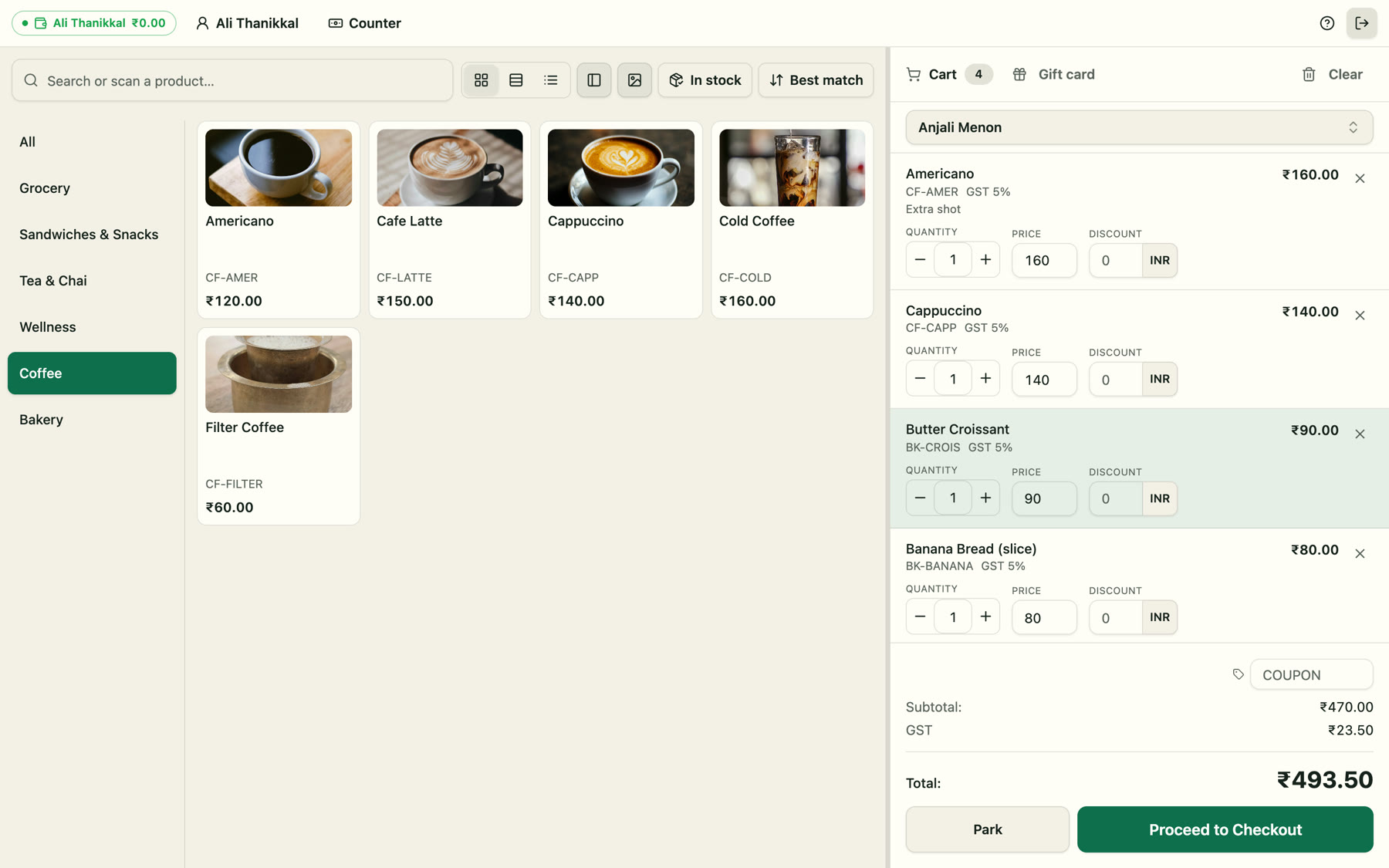
What a long-hours counter needs
The connection is not part of the deal
Sales, returns, shift opens and closes and cash movements are written to the device first and posted from a queue. Receipts print immediately with the counter's own reference; the invoice number arrives when the sale syncs. Each sale carries a key that makes a repeat impossible, so two offline sales are always exactly two invoices.
- Keeps selling on a cached catalogue and prices
- Receipt prints immediately; invoice number follows
- Ordered queue, exactly-once posting
- Anything the server refuses is shown with the reason
- Returns work offline against this counter's copy
- A setting decides whether to sell below recorded stock
Three shifts, one drawer, no arguments
Handing over mid-shift is a PIN, not a logout: the next cashier is signed in as themselves on the same counted drawer. Stepping away locks the screen without closing the shift. The end of the shift is a blind count — the expected figure appears only after the cash is entered.
- Switch cashier by PIN in seconds
- Lock the screen without closing the drawer
- Float at open, blind count at close
- Variance recorded against the shift and the person
- Cash in and out with a reason and a counter account
- A mis-keyed movement is voided with a reversing entry
Every drawer open has a name on it
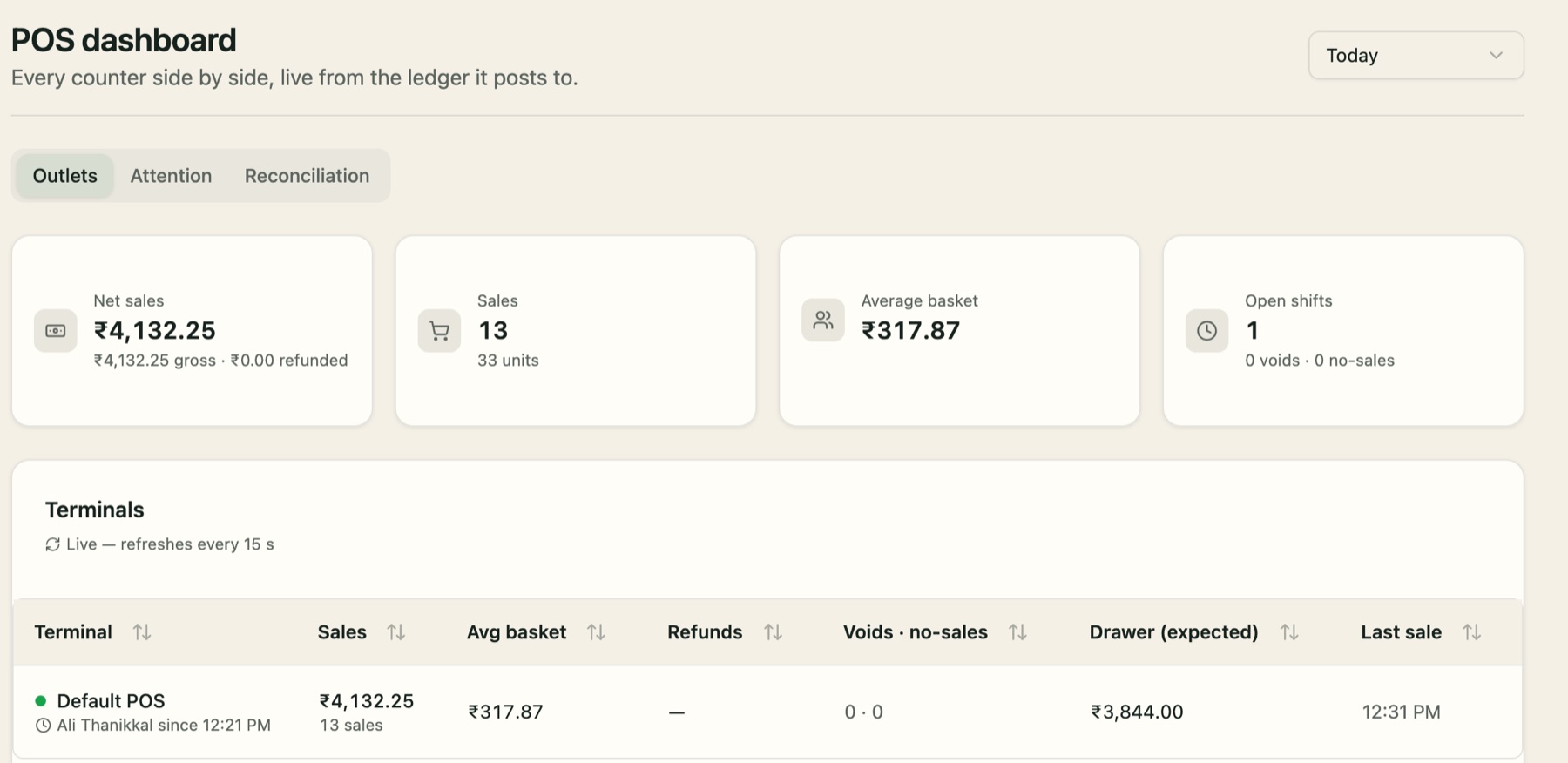
Opening the drawer without a sale is a permission, it needs a reason, and it lands on the audit trail with the person who did it. Voided lines are recorded with their value. The dashboard scores each shift on variance, voids, refunds, discounts and no-sales, against thresholds you set.
- No-sale opens with a required reason
- Line and basket voids recorded with value
- Price overrides kept beside the list price
- Refund and discount rates per shift
- Thresholds you choose, not a vendor default
- Each flag opens the shift behind it
A small shop with a real back office
The same system holds purchases, supplier invoices, expenses, VAT returns and the statements — so a shop with one counter still closes its month without a bookkeeper rebuilding it from receipts.
- Purchase orders and supplier invoices
- Expenses with AI document capture
- VAT or GST returns from the same ledger
- Trial balance, P&L and balance sheet in SQL
- Bank reconciliation against the drawer accounts
- Ask the assistant how yesterday went
Fast where it matters
Wedge scanner, quick-tender chips, exact cash, a numeric keypad on touch screens, parked baskets and a drawer that opens itself on a cash sale. Age-restricted lines can carry a note, and the receipt footer carries whatever the shop must print.
- Any USB or Bluetooth scanner, no setup
- Quick cash amounts and exact cash
- Park and resume a basket
- Drawer kicks on cash sales
- Receipt footer per shop
- Customer display on a second screen
Twenty-four hours
- 05:00Open the counter with a counted float for the morning shift.
- 07:30The line drops in the rain. Nothing changes; eleven sales queue behind the counter.
- 07:52The line returns. Eleven sales post, eleven invoice numbers, no duplicates.
- 14:00Shift change: PIN, signed in as themselves, same open drawer.
- 19:10Drawer opened to give change for the car wash — reason recorded, manager notified by the flag.
- 22:00Blind count. 3.00 over; the shift note explains it and the variance is in the ledger.
- 22:05Night shift opens a fresh drawer and the day is already closed in the books.
What the books get
A 23.00 sale with 15% VAT paid in cash, rung while the connection was down:
Specification
| Resilience | Offline queue with ordered, exactly-once posting; per-device storage checks; a needs-attention state for anything the server refuses; shift and cash movements queue the same way |
| Devices | Windows, macOS and Linux desktop app; iPad and Android tablet; phone; any browser, installable as a web app |
| Printing | ESC/POS thermal printers over the network, or USB / serial / Bluetooth through the computer's print queue; 58 mm and 80 mm; cash drawer opens on cash sales |
| Tenders | Cash, card, bank transfer, gift card, store credit, loyalty points and on account (the balance stays on the customer's receivable); mada in Saudi Arabia, UPI with a scan-to-pay QR in India; split across any number, each banked to the account you choose |
| Cash control | Shifts per counter with a counted float, cash in / out with reasons, blind count at close, X and Z reports, variance, cashier PIN switch, audited drawer opens |
| Offline | Every sale, return and cash movement queues on the device and posts exactly once when the connection returns |
| Compliance | ZATCA Phase 1 QR and Phase 2 clearance (Saudi Arabia), GSTIN with HSN/SAC and a UPI QR (India), TRN (UAE), plain receipts elsewhere |
| New | ID checks recorded per sale; punch cards; account payments at the counter |
New at this counter
What the night shift now has:
- ID checks for tobacco and alcohol. The counter asks before the line goes on the bill and records who confirmed it; the server refuses a sale that skipped it.
- Punch cards on coffee and snacks, rewards as store credit.
- Account customers settle at the counter — a local business’s monthly tab, paid where it was run up.
Integrations on request: fuel-pump controllers, lottery and bill-payment terminals, and card terminals from your country’s acquirer (Geidea and mada in Saudi Arabia, Pine Labs and Razorpay in India, Stripe elsewhere).
The whole counter
Everything above sits on one product. This is all of it, the same in every edition, whether or not your counter needs each part on day one.
Selling
- Search by name, SKU or barcode; category chips; sort by best-selling or recently sold
- Variants on one card, with a picker; a variant barcode adds that variant directly
- USB and Bluetooth scanners with no setup; camera scanning in the mobile app
- Keyboard shortcuts: F2 search, F4 pay, F6 park, F8 returns, F9 exact cash
- Line and cart discounts, and price overrides, each behind its own permission
- Sold by the piece, kg, metre or litre; weight and price labels from scales
- Options with minimum and maximum choices, priced on the line
- Park a cart with a note and resume it on any counter
- A second screen for the customer; a self-checkout kiosk
- Full-screen register mode; phone and tablet layouts built for touch
Payments
- Cash with quick-amount chips, a keypad and exact cash; change worked out
- Card and bank transfer with a reference, banked to the account you choose
- Gift cards, store credit and loyalty points as tenders
- On account, within the customer’s credit limit
- mada in Saudi Arabia; UPI with a scan-to-pay QR in India
- Split one bill across any number of tenders
- Tips to a liability, never revenue; a service charge by percentage
- Account payments at the counter, oldest invoice first
- Trade-ins and charge-to-room, where the counter uses them
Receipts
- 58 mm and 80 mm thermal slips, printed as an image so every script prints as shown
- Auto-print, and the drawer opens on cash sales
- Email with the invoice PDF attached; WhatsApp with a link to it
- Reprint any sale from Transactions
- The receipt title, tax number and fiscal QR your country requires
- Serial, batch, expiry and HSN on the lines that need them
Customers and loyalty
- Walk-in by default; any customer from the address book in one search
- Customer groups, with their own promotions and price lists
- Price lists with quantity breaks, by group or by counter
- Promotions: percent off, amount off, fixed price, buy X get Y, N for X
- Schedules, days, hours, limits and coupon codes that say why they did not apply
- Points, tiers with multipliers, and punch cards that pay out as store credit
- Gift cards sold, reloaded and voided, booked as a liability
Stock
- Each counter sells from its own location, with live on-hand on every card
- Low stock, out of stock, not stocked here and backorder, per product
- Serial numbers and batches with expiry, soonest-expiry first
- Returns put back the exact unit or batch that came back
- Recipes that take ingredients off the shelf, costed first-in-first-out
- Transfer stock between locations from the counter
- Price and product changes reach open counters without a reload
Cash and trust
- Shifts per counter with a counted float
- Cash in and out with reasons; a mistake is voided with a reversing entry
- Blind count at close, X and Z reports, and the variance
- Every cashier is a real user; switch by PIN, lock the counter to step away
- Permissions checked by the database, not just the screen
- Voids, no-sale drawer opens and sign-ins recorded with a name
Returns
- Return any line or all of them, against the original sale
- Refund in cash, as a credit on the account, or as store credit
- A credit note every time, with its own number
- Returns work offline against the counter’s own copy of the sale
Tables and kitchen
- Floors and tables with seats; table states: free, seated, not sent, bill printed
- Move or merge tables, or move some items onto another table’s bill; the kitchen gets a slip
- Kitchen tickets per station, printed and on a kitchen screen, in rounds
- A kitchen log with time to plate, reprints and cancelled tickets
- Courses and seats; split by item or seat; print the bill before paying
- Comps with a reason, a daily limit per person, a manager PIN past it, and a report
- Guests order from the table by QR, from the categories you choose
- Pickup and delivery orders, with a delivery charge added for you
- Reservations and a waitlist; tips paid out to each server
Offline
- Sales, returns, cash movements and shift open and close all work offline
- Everything queues on the device and posts exactly once when the line returns
- Anything the server refuses stays visible, with the reason, until someone acts
Oversight
- A live dashboard of every counter and outlet, refreshed every 15 seconds
- Sales by hour, tender mix and top items
- Attention flags at thresholds you set: variance, voids, refunds, discounts, no-sales
- Reconciliation: what the counters took against the ledger and the journal
- Reports for tips, comps and ingredient shortfalls
Compliance
- ZATCA Phase 1 QR and Phase 2 clearance in Saudi Arabia
- GSTIN with HSN/SAC in India; TRN in the UAE; VAT numbers elsewhere
- Age checks and prescriptions before the line goes on the bill
- A controlled-drug register, batch recalls and warranty checks by serial
Devices and hardware
- Desktop app for Windows, macOS and Linux
- iPad and Android tablets, and phones; or any browser, installable
- ESC/POS printers on the network, or USB, serial and Bluetooth through the computer
- Cash drawers on the printer’s port; ticket printers per kitchen station
Screens from a demo workspace, “Cardamom Cafe & Store” in Kochi.
See it on your own counter
Start a free trial at my.biza.app, or ask for a walkthrough on your own shelf, with a real drawer and the connection pulled out mid-sale. The POS guides are at biza.app/docs.